
AI writing assistant for grammar, tone and clarity.
Grammarly's AI checks grammar, tone and style across browsers, desktop and mobile with real-time suggestions.
Detailed overview
What it is
Grammarly is an automated writing assistant designed to polish sentence correctness, grammatical accuracy, and stylistic tone across various digital environments. Operating as a lightweight background software layer, it actively scans written input within word processors, email clients, and web browsers. The utility acts as a persistent editing companion, helping authors refine their output without disrupting their existing digital workflows or requiring them to copy and paste text into a separate application. It ensures a consistent standard of polish across different platforms.
How it works
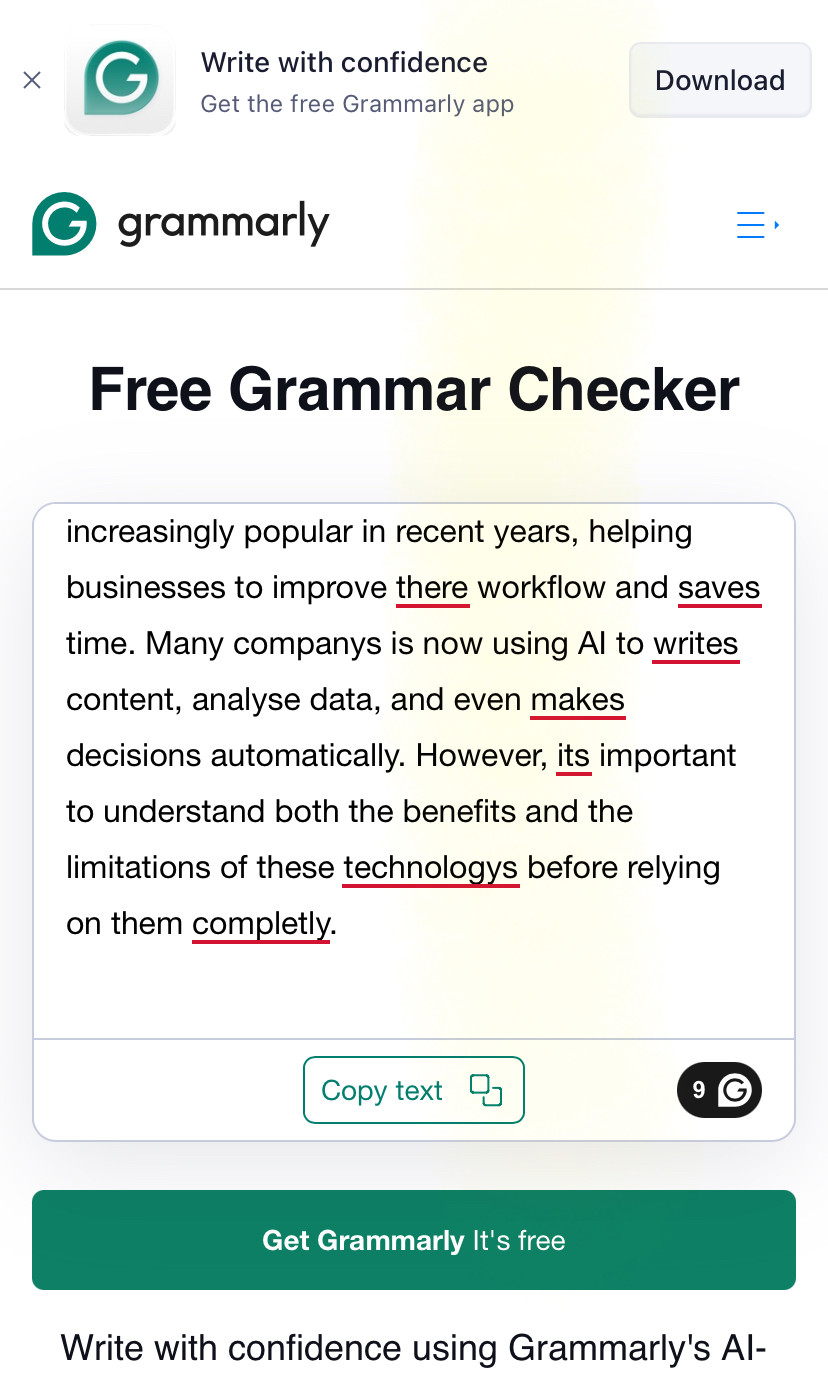
The underlying technology combines traditional rule-based grammar scanning with sophisticated machine learning models trained on style patterns to analyze text as it is entered. It highlights detected errors inline, allowing writers to review recommendations directly in their active window. The system operates continuously in the background of web-based communication tools, eliminating the copy-and-paste step. Users can utilize integrated generative features to assist with text creation, while adjusting settings to adapt to different writing scenarios. This real-time processing ensures that vocabulary, syntax, and sentence structure are analyzed dynamically as the user types, delivering instantaneous feedback that can be applied with immediate actions directly inside the draft document.
Main features
- Real-time tone detection indicators that evaluate sentence structure to determine if messages read as confident, blunt, friendly, or formal
- Generative AI writing assistance offering quick prompts to rewrite sentences, summarize long documents, or draft text blocks from scratch
- Deep plagiarism checking functionality that compares written content against billions of active web pages and academic sources to ensure original phrasing
- Shared team style guides designed to align brand voice, vocabulary, and terminology across organizations with multiple contributors
- Customizable goal settings that tailor correction algorithms based on selected target audiences, formality levels, and writing intents
See it in action
Pricing
Pricing model: Freemium
The platform operates on a multi-tier model. Upgrading from the entry tier to paid individual or business subscriptions unlocks advanced style corrections, generative tools, and plagiarism scans, with corporate tiers billed on a per-seat basis. Users are advised to verify active plans on the provider's official website as features and subscription limits can change.
Plans and prices change often. Always confirm the current terms on the official Grammarly website.
Pros
- Broad system integration that functions smoothly across daily-use web browsers, desktop apps, and platforms like Gmail, Google Docs, Slack, and LinkedIn
- Unobtrusive real-time correction engine that marks issues with colored inline underlines and offers convenient, instant one-click fixes
- An accessible free tier that provides unlimited checks for fundamental grammatical errors, punctuation mistakes, and spelling slip-ups without requiring a subscription
- Conservative recommendation algorithms that polish readability and flow without stripping away or mangling the author's authentic personal voice
- Simple, rapid deployment process utilizing a lightweight browser extension, desktop application, or specialized mobile keyboard interface
Cons
- Generic stylistic suggestions that can occasionally flag or over-correct intentional creative choices, technical jargon, or specialized vocabulary
- Occasional extension intrusiveness and layout clutter when typing in complex web pages or customized online text fields
- Significant subscription price increase required to transition from the basic free tier to premium and business plans
- Limited capabilities for structural story development or creative brainstorming compared to specialized AI content generation tools
- Key organizational tools such as centralized analytics, team style guides, and administrative controls restricted strictly to paid tiers
Our Take: Is Grammarly Worth Using in 2026?
Independent editorial analysis by AI Vision Hub, based on Grammarly's publicly available documentation and pricing information. This is our opinion, not a lab test — see how we evaluate AI tools.
Best for / Not for
This utility is ideal for students proofreading essays, job seekers refining resumes, and non-native English speakers needing assistance with phrasing. It also suits professional copywriters, content marketers, and client-facing teams seeking a standardized baseline of polish across reports and social posts. However, it is less useful for creative authors seeking deep developmental feedback, or individuals who prefer isolated, distraction-free editing environments. Those focused strictly on maximizing readability and sentence simplicity should consider Hemingway Editor, while teams requiring heavy-duty generative drafting from scratch will benefit more from dedicated AI platforms like Jasper. It is particularly designed for high-volume corporate communication environments where speed demands continuous automated proofreading to prevent errors from slipping into public-facing copy, though it remains too automated for specialized technical writing and creative storytelling.
Final verdict
Grammarly remains an exceptionally practical, low-friction editing companion that excels at polishing daily communication. While it is not a full substitute for human proofreaders or dedicated drafting engines, its seamless platform presence makes it an invaluable polishing layer that easily integrates into any digital workflow. It offers reliable, real-time feedback that keeps writing clean, precise, and professional.
Alternatives to Grammarly



Related AI guides
Hands-on reading that puts Grammarly in context alongside similar tools.
Frequently asked questions
- Is Grammarly free?
- Grammarly offers a free tier with limits, plus paid plans for heavier use.
- What is Grammarly best used for?
- AI writing assistant for grammar, tone and clarity.
- What are the best alternatives to Grammarly?
- Consider ChatGPT, Claude, Gemini, Perplexity AI. You can compare every option in the AI tools directory.
- How was this listing put together?
- Compiled by hand from Grammarly's public website and documentation . Information can change; check the provider's official site for the latest pricing and availability. It is not a paid placement — see our affiliate disclosure. Spotted something out of date? Tell us.
User reviews
No user reviews yet — we don't publish placeholder or generated ratings.